Linux For DevOps

I’m a DevOps engineer who loves to build things that make people’s lives easier. I’m passionate about learning new technologies and sharing my knowledge with others. When I’m not coding, you can find me hiking, reading.”
#90daysofDevOps
🛜Day2:Basic Linux commands for DevOps
🎆Introduction
Now days fast-paced and highly competitive IT industry, DevOps has become a crucial methodology for organizations looking to streamline their software development and deployment processes. In this methodology lies Linux, the open-source operating system that empowers DevOps engineers to achieve scalability, flexibility, and automation.
♾️What is Linux?
Linux is an open-source operating system that was initially developed as a free alternative to proprietary Unix-based systems. It has grown into a robust and widely adopted operating system used in various domains, including servers, embedded systems, desktops, and mobile devices. Linux is known for its stability, security, flexibility, and scalability.
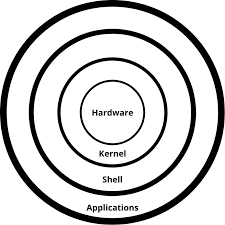
🚨Architecture Of Linux
• kernel: It is like the heart of the Linux operating system (OS), acting as the central connection between the computer's hardware and its running programs.
• Shell: It is a text-based interface where users can enter commands, run programs, and control files like handling files, setting permissions, and managing directories.
• Application: A group of functions created to accomplish specific tasks.
• Hardware: It includes devices such as processor(CPU), memory(RAM), storage devices(hard disk drive), input/output devices(keyboard, mouse, display), network interfaces, and other peripherals.
🤖Linux Commands That DevOps Engineers Should Know
As a DevOps engineer, Must know the Linux commands is essential for efficient system administration, automation, and troubleshooting. Here are some Linux commands that DevOps engineer should know:
ls -> It shows available files and directory lists in the present working directory.
ls -l -> It is used for knowing the details of files and directories.
ls -a -> It is used for showing the list of all the hidden files.
pwd -> It displays the present working directory.
cd -> It is used for changing the directory.
cd .. -> It is used to move one directory back from the present directory.
cd ../.. -> It is used to move two previous directories from the present directory.
echo -> It is used to display the line of text or strings that are passed as argument.
cp -> It is used to copy files from one directory to another.
mv -> It is used to rename and replace the files.
touch -> It is used to create empty files.
cat -> It is used to display file content on the terminal.
mkdir -> It is used for creating a new directory
tree -> It is used to display the file system's directory structure in a tree-like format.
rm -> It is used to remove the file.
rm -r -> It is used to remove the directory.
whoami -> It is used to display the current username.
man -> It is used for accessing the lab manual of Linux commands
sudo -> It is used to run commands with administrative privileges.
useradd -> It is used for creating a new user account.
passwd -> It is used for creating a password for the user.
vim -> It is used as an editor to create or edit a text file.
head -> It is used for printing the first ten lines(by default) of a text file.
tail -> It is used to display the last ten lines(by default) of a text file.
I hope this blog has helped you to know the concept of Linux& how it is benefiting the organizations🚨
kindly support and follow for more updates
Happy Learning😊:)
